Tracepath
Display VPP graph path information on current trace buffer entries & filter trace output to only match a specific path.
Basic Usage
Start a trace, send traffic, then use show trace paths to see a summary of
all unique forwarding paths observed across all threads:
vpp# trace add pg-input 100
vpp# show trace paths

Found 2 unique paths across all threads (showing top 2):

 [0] Count: 7  ID: 0x00000007c61bef93  Length:  7  Threads: [0]
     Path: pg-input -> ethernet-input -> ip4-input -> ip4-lookup -> ip4-drop -> error-drop -> drop

 [1] Count: 5  ID: 0x0000000707c1f778  Length:  7  Threads: [0]
     Path: pg-input -> ethernet-input -> ip4-input -> ip4-lookup -> ip4-rewrite -> pg1-output -> pg1-tx
Use show trace path <INDEX> to display the full packet traces for a given
path:
vpp# show trace path 0

==================== Path [0] ====================
Path: pg-input -> ethernet-input -> ip4-input -> ip4-lookup -> ip4-drop -> error-drop -> drop
Threads: [0]  Count: 7

--- Thread 0 vpp_main ---
Packet 1

00:00:00:682233: pg-input
  stream 0, 42 bytes, sw_if_index 1, next_node ethernet-input
....
Multiple path indices can be passed to show trace path:
vpp# show trace path 0 1
Usage with Trace Filters
Trace filtering can be used in addition to tracepath commands to facilitate troubleshooting.
Using a classifier filter to trace only packets from a specific source IP:
vpp# classify filter trace mask l3 ip4 src match l3 ip4 src 172.16.1.2
vpp# clear trace
vpp# trace add pg-input 1000 filter
vpp# show trace paths

Found 1 unique paths across all threads (showing top 1):

 [0] Count: 5  ID: 0xa2d74d57dc94f686  Length:  7  Threads: [0]
     Path: pg-input -> ethernet-input -> ip4-input -> ip4-lookup -> ip4-rewrite -> pg1-output -> pg1-tx

vpp# show trace path 0

==================== Path [0] ====================

Path: pg-input -> ethernet-input -> ip4-input -> ip4-lookup -> ip4-rewrite -> pg1-output -> pg1-tx
Threads: [0]  Count: 5

--- Thread 0 vpp_main ---
Packet 1

00:00:00:310785: pg-input
  stream 0, 42 bytes, sw_if_index 1, next_node ethernet-input
...
00:00:00:310829: ip4-lookup
  fib 0 dpo-idx 5 flow hash: 0x00000000
  UDP: 172.16.1.2 -> 172.16.2.2
...
00:00:00:310837: ip4-rewrite
  tx_sw_if_index 2 dpo-idx 5 : ipv4 via 172.16.2.2 pg1: mtu:9000 next:4
...

vpp# classify filter trace del
Alternatively, use a BPF filter (from bpf_trace_filter plugin):
vpp# set bpf trace filter {{src host 10.0.0.5}}
vpp# set trace filter function bpf_trace_filter
vpp# trace add pg-input 1000 filter
vpp# show trace paths
...
Graphviz Output
Command show trace paths graphviz can be used to dump paths in graphviz dot format.
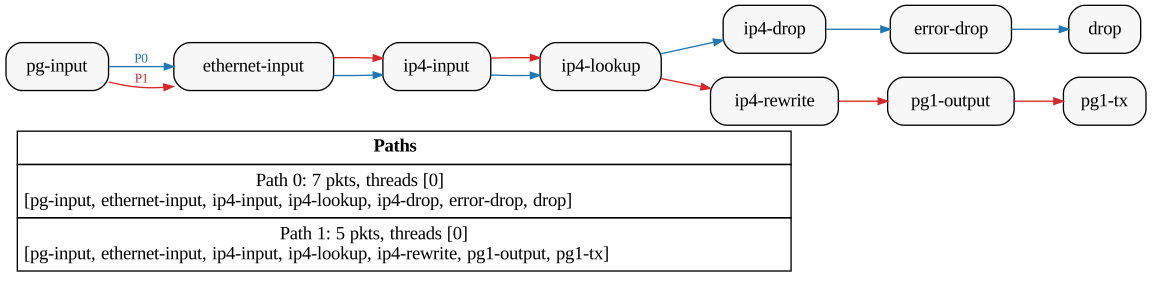
Example Graphviz output.